Smart Align
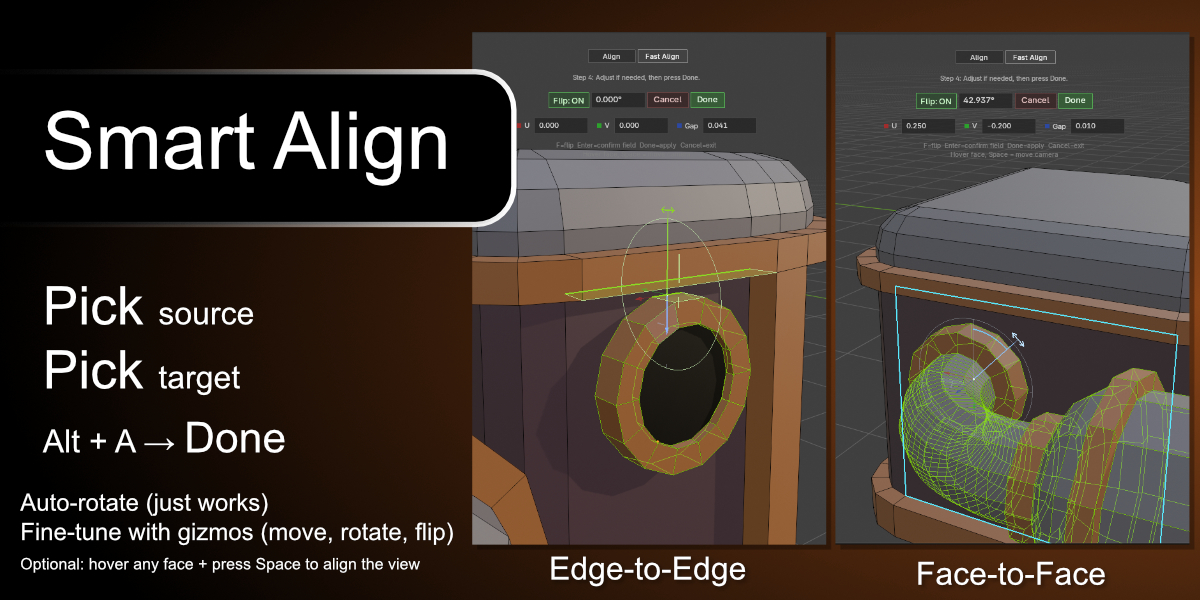
CAD-like precision for Edit Mode alignment. Align faces, edges, vertices, or full geometry islands with a predictable source-to-target workflow.
Align
Guided source-to-target placement for precise assembly work, including partial selections when needed.
Fast Align
Select a reference and target element, then align instantly. The connected geometry island moves when applicable.
Fine Tune
Use rotation, U / V / Gap offsets, viewport gizmos, snapping cues, and face-aligned camera assist during adjustment.
Workflow
- Select the geometry, island, or reference element you want to move.
- Select the target vertex, edge, or face.
- Press Alt + A and choose Align or Fast Align.
- Fine tune with rotation, offsets, gizmos, or Space face-view align, then confirm with Done.
Why It Helps
It works directly in Edit Mode, moves full geometry islands when needed, and keeps alignment results predictable for hard-surface and CAD-style modeling.
What It Solves
Smart Align is built for placement tasks where manual transforms are slow or hard to repeat. Instead of switching modes or guessing transforms, you define a source reference and a target reference, then adjust the result with focused fine-tune controls.
Best For
- Hard-surface assembly inside Edit Mode.
- Moving connected geometry islands without losing the selected reference intent.
- Face, edge, vertex, parallel, and perpendicular alignment situations.
- Post-align correction with local U / V / Gap movement and rotation.
Product Screens